Method article
The BDX Method
Connecting observed behavior to experience improvement
Chris Durgin · Version 1.8 · Updated · About 18 min for the main article
Abstract
Behavior-Driven Experience (BDX) is an approach I developed to connect behavioral research to product decisions and continuous improvement. It helps teams examine friction, motivation, context, feedback, and trust in relation to a meaningful user goal. This article introduces the approach, examines Mill operations and STN Charms applications from my practice, and provides a practical way to begin. A downloadable scorecard combines five working sections with illustrated companion guidance; a calculating workbook and fictional worked example show how to apply the method.
Start with meaningful behavior
A usable screen can still leave people unsure when to act, why an action matters, or whether its result can be trusted. BDX asks what people need to do to achieve their goals, and examines how the experience and its surrounding environment support that behavior.
The intended audience includes product, research, design, engineering, and human-factors practitioners investigating adoption or workflow problems. Describe the user benefit before choosing a behavioral target. More clicks or more time in a product are not inherently better outcomes.
Established foundations and my contribution
BDX brings behavioral science, human-centered research, human factors, and product strategy into an assessment and improvement process. My contribution is a practical structure connecting an observed barrier to a design hypothesis, a prioritized change, and follow-up evaluation. Four categories and twelve dimensions organize that inquiry.
The Fogg Behavior Model (B = MAP) examines how motivation, ability, and a prompt converge at the moment of action. A missing action may reflect a difficult workflow or poorly timed prompt. Investigate the context before choosing an intervention. The companion guide also uses the Hooked Model selectively to examine trigger, action, variable reward, and investment when recurring behavior serves a user need. A possible cognitive bias is an explanation to investigate, not a diagnosis of someone who hesitates or does not use a product.
When BDX adds value
Use BDX when a team needs to connect evidence about a behavior to a prioritized intervention and follow-up learning: for example, when people can operate a feature but the surrounding workflow, prompts, or trust still obstruct their goal. Use the assessment to decide what to improve and what to learn next.
A usability review can identify interaction problems; workflow analysis can expose roles, handoffs, and constraints; the Fogg Behavior Model can help examine motivation, ability, and prompts. BDX organizes findings from these practices across assessment, prioritization, design, and evaluation.
Use the simpler approach when it answers the question. A known form error may need a usability fix and a focused check rather than a twelve-dimension assessment. Where evidence is missing, begin with exploratory research. Neither AI nor personalization is required; a clearer explanation or a change outside the interface may be the appropriate intervention.
How I developed BDX
I developed BDX during my work at Neudesic to connect research about people’s behavior with product and design decisions. The applications discussed here include Station Casinos’ STN Charms project, which began in November 2022, Morenci Concentrator work in March 2023, and Metcalf Concentrator work in August 2024.
Across these projects, I used contextual inquiry, interviews, surveys, and usability studies as appropriate to the question. I documented the work in spreadsheets, notes, and research reports. Those activities shaped the method’s focus: identify a barrier in real work, make a targeted change, and evaluate what happens next.
I later organized those practices into the categories and working process presented here. I use today’s dimension names to explain those earlier decisions.
Working through BDX
- Discover. Identify the user goal and observe the work. Gather research on context, constraints, decisions, and barriers; distinguish observation from interpretation.
- Evaluate. Use the assessment dimensions to organize evidence and identify where the experience helps or obstructs the goal. Mark unsupported conclusions as hypotheses.
- Identify opportunities. Consider clearer information, reduced effort, better recovery, feedback, or changes to the wider workflow. AI, automation, and personalization are options when the evidence supports them.
- Prioritize and design. Select a focused opportunity using its user value, feasibility, risk, and evidence confidence. Prototype the change and define what would count as improvement.
- Measure and improve. Compare observed behavior and outcomes with the starting conditions, examine unintended effects, and revise the intervention.
Revisit these activities as new evidence changes the question. Carry supported changes into implementation, then use research and outcome measures to guide the next iteration. The scorecard and hse-agent skill support this cycle; neither is required to follow it.
Four assessment categories
Behavioral Friction: Clarity of Intent, Friction & Load, and Error Recovery & Safety. Can people understand the task, carry it out, and recover when something goes wrong?
Motivation Alignment: Motivation Alignment, Habit Loop Support, and Emotional Resonance. Does the action make sense in the person’s actual work? Recurrence should serve a real need, rather than create unnecessary dependency.
Contextual Personalization: Personalization Relevance, Behavior Nudges, and Decision Support. Does the experience offer appropriate help at the right moment while preserving control? A consistent experience may be preferable to personalization.
Adaptive Feedback & Optimization: Feedback & Response, Trust & Transparency, and Accessibility & Inclusion. Can users understand the result, assess its basis, and participate without avoidable barriers?
These groups organize four questions: what obstructs action, why the action matters, what help fits the context, and how people understand the result. The twelve dimensions make those questions concrete enough to guide observation and design discussion.
Use the categories flexibly: accessibility matters throughout the workflow, and decision support depends on the person’s task and context. Examine a dimension wherever it helps explain the experience.
Twelve dimensions in practice
Explore each category for practical questions, evidence to look for, and illustrations. Use the dimensions to guide inquiry with or without the scorecard. Dimensions can overlap; they are not independent measurements.
Behavioral Friction
Clarity of Intent
Can people explain the next action and what it will do?
Evidence to look for: Task observations, mistaken predictions, and explanations in the participant’s own words.
Illustration: Ask who receives a report before submission; record uncertainty rather than assuming low motivation.
Friction & Load
What avoidable effort blocks the task?
Evidence to look for: Repeated entry, backtracking, interruptions, and contextual observations of workload.
Illustration: Investigate re-entered report details; retain checks needed for accuracy.
Error Recovery & Safety
Can people recognize and recover from mistakes?
Evidence to look for: Observed errors, correction attempts, recovery paths, and consequences.
Illustration: Check whether a mistaken recipient can be corrected before or after sending.
Motivation Alignment
Motivation Alignment
Does this action serve the person’s actual goal?
Evidence to look for: Interviews linked to observed work, competing priorities, incentives, and reasons for non-use.
Illustration: Determine whether submitting a report helps resolve the issue; avoid treating more submissions as the goal.
Habit Loop Support
Does a recurring task have useful cues and feedback?
Evidence to look for: Repeated-work observations, cadence, cue timing, and evidence of recurring need.
Illustration: Use a reminder only if reporting recurs and the timing fits the work; an occasional task may not need a habit loop.
Emotional Resonance
How does the experience relate to feelings people report?
Evidence to look for: Voluntary self-reports alongside task context; distinguish reported feelings from observer interpretation.
Illustration: Ask about concern over recipient visibility; do not infer fear from hesitation alone.
Contextual Personalization
Personalization Relevance
Would adaptation improve this task while preserving control?
Evidence to look for: Differences in roles, tasks, permissions, preferences, and outcomes under alternative presentations.
Illustration: Compare a relevant recipient default with a consistent manual choice; retain review and override.
Behavior Nudges
Is a prompt useful, timely, understandable, and optional where appropriate?
Evidence to look for: Prompt responses, dismissals, interruptions, and user explanations.
Illustration: Consider a recipient-review cue at submission rather than repeated reminders; test whether it helps.
Decision Support
Can people interpret the evidence and choose an appropriate action?
Evidence to look for: Decision explanations, source checks, uncertainty recognition, and resulting actions.
Illustration: Check whether the recipient preview gives enough information to submit, correct, or stop.
Adaptive Feedback & Optimization
Feedback & Response
Can people tell what happened and what to do next?
Evidence to look for: Status interpretation, timing, repeated actions, and recovery after delays.
Illustration: Verify that a receipt distinguishes sent, pending, and failed reports.
Trust & Transparency
Can people judge how the system handles information and uncertainty?
Evidence to look for: Source comprehension, permission expectations, data-use explanations, and mismatches between expectations and behavior.
Illustration: Explain who can see a report and whether it can be changed; verify the explanation against actual permissions.
Accessibility & Inclusion
Who encounters barriers to participating in the workflow?
Evidence to look for: Research with relevant access needs, assistive-technology checks, and task results across contexts.
Illustration: Check recipient review and correction with keyboard and screen-reader use; record exclusions and unresolved barriers.
Choose your assessment scope
Define the user goal and scope of the inquiry. BDX can address one issue or several related workflows, user groups or projects. Keep each context’s evidence, assumptions and outcomes distinct; compare shared patterns only where the evidence supports it. Name the user or role, the action, the tasks, and the conditions around them; the scorecard’s snapshot provides prompts for recording this context.
Triggers are cues to an action: an external notification, request or interface prompt, or an internal need, feeling or habit. Emotional drivers describe needs such as trust, security, control, curiosity or delight. A driver can influence an action without being its immediate trigger; record what research supports and what remains assumed.
Select dimensions from the observed problem. For a person unsure who receives a report, start with Clarity of Intent and Trust & Transparency. Check Error Recovery & Safety if a mistaken submission has consequences. Record why other dimensions are deferred or not applicable, and broaden the assessment when new evidence reveals another barrier.
For contextual-inquiry findings, synthesize what happened, identify opportunities, compare approaches and recommend what to investigate or change next. Product teammates do not need to know the dimension names or provide ratings; explain the reasoning in everyday language. If an overall score is wanted, establish its scope and explain what evidence and ratings are still needed.
A focused assessment is complete when it answers its stated question and identifies the next action or learning need. For a broad review, consider all twelve dimensions. Use “not assessed” when evidence is missing and “not applicable” when a dimension does not apply to the stated scope; explain the reason for either.
Use evidence before scores
A scorecard can organize discussion, but its numbers need explicit definitions, evidence, and consistent interpretation. Record the research source, context, affected behavior, confidence, and open questions alongside each assessment. Without research, use the dimensions to plan inquiry rather than claim a measured result.
My scorecard uses a 1–5 rating scale with companion guidance. The field workbook follows that workflow and calculates a descriptive Behavioral UX score out of five once all twelve dimensions have been reviewed. It is the mean of the applicable dimension ratings, rounded to one decimal. Justified “not applicable” dimensions are excluded and counted. An unassessed dimension leaves the overall score incomplete; unknowns are never scored as zero. The companion guide defines the anchors, evidence requirements, and comparison limits.
Rate how well the experience supports the user, rather than rating the person. Higher always means better support, including less unnecessary Friction & Load. Follow-up needed is a separate judgment: Yes identifies further research, design or validation; it is not an automatic priority. The matrix then records estimated effort, expected behavioral impact and a reasoned priority. AI opportunities receive no separate numerical score.
The workbook checks entered values and whether N/A has a reason. It cannot verify a research source, decide whether an interpretation is justified, or detect every unsupported rating. A complete score means the entries meet those calculation rules; the practitioner must still review the evidence. If every dimension is N/A, there is no numerical score.
Use this for: Benchmarking, before-and-after comparisons, and tracking over time. The score is my practitioner estimate of how well the assessed system supports user needs. Establish a baseline and use repeat assessments to communicate progress to a team or leadership, alongside coverage, key findings and evidence limits.
For meaningful comparisons, use the same system or a demonstrably comparable scope, consistent rating criteria and evidence methods, and reviewer calibration. Disclose changes in user groups, tasks, conditions or applicable dimensions. A score change reflects a changed assessment of experience support; measure actual user outcomes separately. This is not an industry norm, a validated psychological scale or proof of overall system readiness. Review serious risks independently of the mean.
Applications from my practice
The following cases show how my project teams connected research findings to design decisions and changes in the working experience. The Morenci and Metcalf concentrator projects were for Freeport-McMoRan. MillOps is the concentrator view within ConOps (Connected Operations), with site-specific variations shaped by each concentrator’s needs.
Morenci Concentrator: digitizing measurement and calculation
Understanding work at the point of entry
In March 2023, my Morenci Concentrator work addressed measurement entry and calculations in a paper-based workflow. During contextual inquiry, we observed operators consulting a torn paper calculation grid after taking slurry measurements. The grid was mounted high enough that some operators had to stand on tiptoe to read it. The task combined a physical access problem with the effort of looking up and interpreting the calculation.
We automated the calculation within digital measurement entry. For example, an operator enters unfiltered and filtered specific gravity (SG) values for the wet-grind task and receives a calculated percentage that is immediately shared with the team. The wider experience includes digital shift records and real-time sensor visibility.
The observation changed the task itself: operators could enter measurements and receive a shared result instead of consulting the paper grid. In BDX terms, Friction & Load and Accessibility & Inclusion help organize the observed access and interpretation barriers; Feedback & Response concerns making the result available at entry.
Case at a glance
- Observed issue
- Operators used a high-mounted, torn paper grid to interpret slurry measurements.
- Design response
- Calculate results from digital entries and share them with the team.
- Outcome and limits
- Operators enter measurements, receive calculated results, and share digital shift records with the team.
Metcalf Concentrator: making plant conditions visible
Research across inspections and handoffs
In August 2024, my Metcalf Concentrator work focused on displaying user-entered form data alongside sensor data in the site’s MillOps view within ConOps. EWS (Enterprise Workspace) is the internal platform used for the forms. Research exposed an upstream barrier: users were getting stuck in the forms and encountering poor performance. We improved connectivity and form UX to support the complete form-to-overview workflow.
Users valued seeing the measurements, but also wanted critical issues and open plant conditions immediately visible when opening the Metcalf Concentrator overview. This identified a need for a supervisor-level overview in addition to processing-area views. The design surfaced conditions with the reporter’s summary, notes, photographs, and plant location so teams could identify where attention was needed.
The work connected two decisions: address form barriers that affected the supply of information, and organize the overview around where attention was needed. Friction & Load relates to the entry workflow; Decision Support and Clarity of Intent relate to the supervisor overview. Metcalf operations teams now use the view daily to understand plant conditions and triage issues in their morning meetings.
Case at a glance
- Observed issue
- Form performance blocked information entry; supervisors needed immediate visibility of critical conditions.
- Design response
- Improve connectivity and form UX, then surface conditions in a supervisor overview.
- Outcome and limits
- Metcalf operations teams use the view daily to understand and triage plant conditions in morning meetings.
Station Casinos: refining the Charms experience
Testing comprehension in the usage setting
The STN Charms project for Station Casinos began in November 2022. In the last week of April 2023, once a preliminary version had been built and installed on actual slot-machine hardware, we conducted usability testing, interviews, and surveys on site in a closed casino test environment, before full release. Participants were asked to discover Charms, apply one to gameplay, play with it, and understand features such as the rarity rating. Research also examined reactions to the proposed charm imagery.
During the on-site study, players responded more positively to the buffalo than the lucky-cat charm proposed as the lead branding image. Their feedback prompted us to reconsider the imagery before release.
We used the study findings to refine navigation, workflow, and discoverability within the slot-machine service window before the final release. We documented the findings roughly a week after the study, following review and synthesis. My case study includes service-window designs and excerpts from the study reports.
Emotional Resonance provides a lens for discussing the imagery feedback, while Clarity of Intent and Feedback & Response frame discovery and use. The case illustrates research informing both communication and interaction design. The focus was helping players discover, understand, and use Charms.
Case at a glance
- Observed issue
- Participants needed to discover and understand Charms; imagery feedback challenged the proposed marketing direction.
- Design response
- Reconsider imagery and refine service-window navigation and discoverability before final release.
- Outcome and limits
- Player feedback informed imagery decisions and service-window refinements before final release.
From a research finding to an improvement opportunity
You can apply BDX without assigning scores. This fictional example shows how to turn a research finding into a proposed improvement and a question to test next. Clarity of Intent and Trust & Transparency help focus the inquiry; the proposed change remains a hypothesis until evaluated.
| Step | Reasoning and action |
|---|---|
| Finding | In this fictional study, a participant hesitates before submitting a report and says they do not know who will receive it. |
| Interpretation | Unclear recipients may make it difficult to decide whether to submit. Check what the person understands about visibility and permissions; other concerns may also explain the hesitation. |
| Opportunity | Show who will receive the report before submission, with a way to correct the recipient or stop. The preview must reflect actual access rules. |
| Next test | Ask representative users to identify the recipients and decide whether to submit, correct, or stop in realistic tasks. Compare understanding and errors with the current flow. Appropriate non-submission can be a successful outcome. |
AI support and human judgment
hse-agent includes BDX guidance for structuring evidence, examining friction, and suggesting opportunities. Its public skill defaults to flexible analysis and uses the published scorecard when requested or useful. An agent can organize several related issues or projects, retaining the sources and limits of each rather than combining unrelated ratings. Provide the actual research and constraints, ask it to separate observations from hypotheses, and inspect each recommendation against the sources. AI-generated explanations of behavior remain interpretations to evaluate.
Using AI to assist research is a different decision from adding AI to the product. In the workbook, the practitioner develops and records recommendations. With the BDX skill, the agent helps interpret findings, prioritize opportunities, and assess where agentic assistance, automation, personalization, or simpler UX and workflow changes merit exploration. The practitioner reviews the reasoning and decides what to pursue.
The optional AI + Personalization Insights page explores five areas: Personalized Data Entry, Predictive Guidance, Contextual Nudges, Conversational Support, and Delay Anticipation. Use the categories relevant to the problem. Compare proposals with simpler alternatives, connecting each to a user goal, supporting evidence, uncertainty, human control, and the next inquiry or test. Contextual prefill can use equipment or task information without requiring individual personalization or AI.
Carry supported findings into a Product Experience Blueprint, including the user decision, proposed capability, remaining assumption, and validation task. That creates a connection between behavioral understanding and implementation.
Agency, limitations, and evaluation
Behavioral design should support users’ goals and informed choices. Evaluate autonomy, accessibility, safety, and effects on people beyond direct users alongside business outcomes.
These practice accounts draw on my experience, portfolio case studies, and available project records. I use the current BDX dimensions to explain earlier decisions; numerical BDX scores were not recorded for these cases. The accounts document research findings, design changes, and reported use. They do not isolate the effect of BDX: comparative measurements would be needed to quantify changes in task time, errors, or other user outcomes.
Use the categories to ask better questions about the experience. Support your interpretation with observations, and consider other explanations for the behavior. When several practitioners assess the same experience, discuss differences in their judgments and the evidence behind them. After making a change, compare what users can accomplish before and afterward under similar conditions. Record what changed and what else may have influenced the result.
Try one behavior first
Choose a user goal, describe one behavior needed to achieve it, and gather evidence about a barrier. Map that evidence to an assessment dimension, propose one change, and define the observation that would support or challenge your hypothesis.
A useful assessment ends with a decision: what to change, why it matters, and what to observe next. Start with that one decision, then expand only when the next question calls for it.
Choose a tool that fits the inquiry
An adoption concern may call for a behavior map, research plan, intervention strategy, or improvement backlog. Choose the output that helps the team decide what to investigate or change next. The scorecard below provides an optional structure for recording one project or target, with companion guidance and a completed fictional example.
I am also developing a BDX application to connect context, assessment, opportunities, delivery planning, and measurement. The resources below can be used independently of that application.
Apply BDX in the field
Start with one workflow moment. Review the twelve dimensions, select those relevant to the decision, and keep observations separate from interpretations. “Not assessed” and “not applicable” are useful answers when accompanied by a reason.
Use the BDX Scorecard
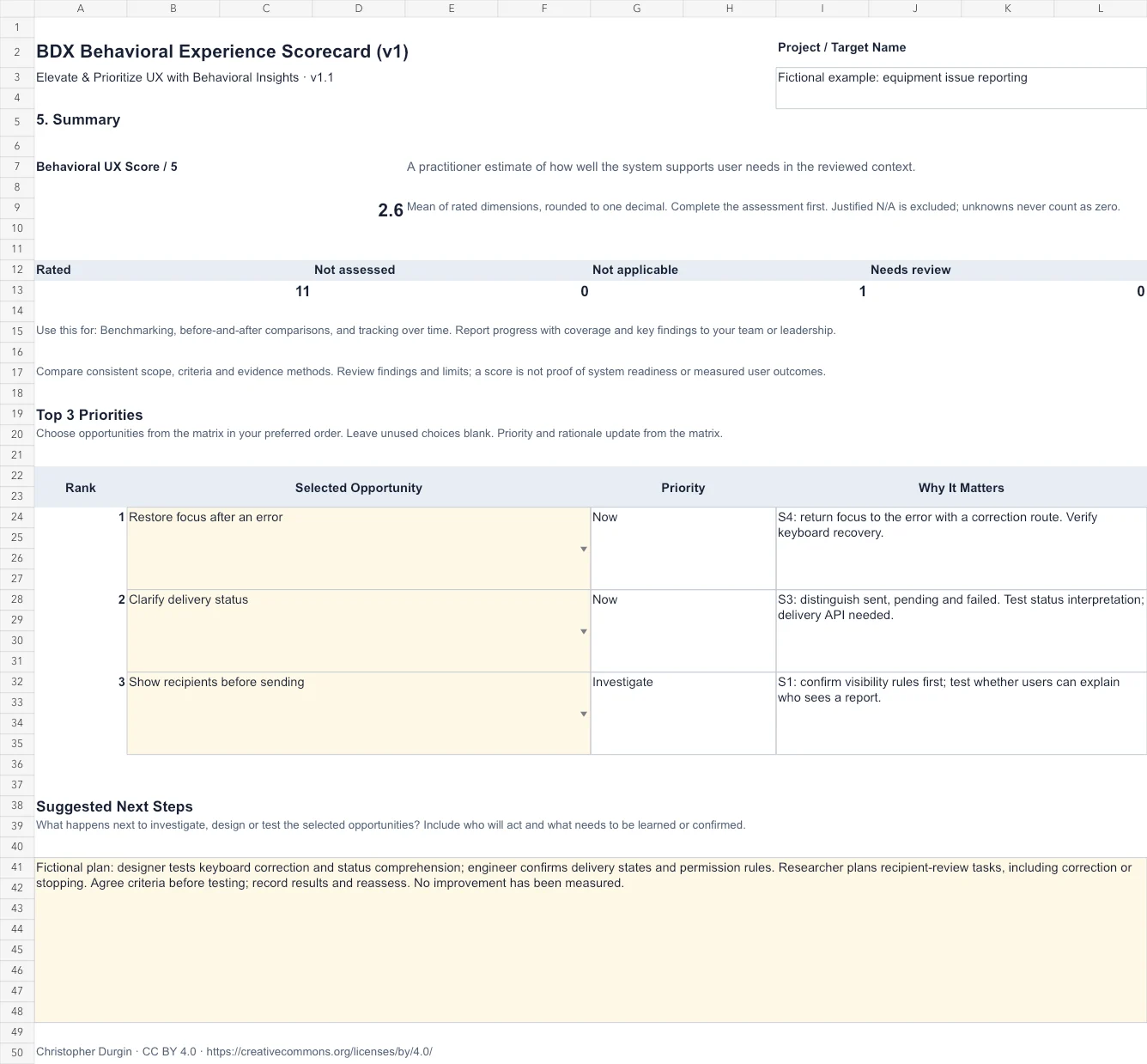
The scorecard is optional: use it when a structured assessment helps. Each file covers one project or target; BDX itself can address broader or related concerns. Begin with the user behavior snapshot and research context, assess the twelve dimensions, explore AI or personalization where useful, and prioritize opportunities before writing the summary. Two illustrated companion pages explain rating anchors, unknowns, facilitation, and responsible use of behavioral models.
Choose the PDF for reading, printing, and handwritten entries. The workbook links the project name across the working pages and calculates the descriptive Behavioral UX score and assessment coverage. Select up to three opportunities in the summary; their priority and rationale update from the matrix. Priority order remains your decision.
Use the score for benchmarking, before-and-after comparisons, and tracking over time. It estimates support for user needs. Use comparable scope, criteria and evidence methods; report coverage, findings and limits alongside progress. It does not establish system readiness. You can identify and prioritize opportunities without a score.
Version 1.1 · Christopher Durgin · CC BY 4.0 · No macros or server required.
The completed example shows the full chain from synthetic observations to ratings, proposed changes, selected priorities, and a validation plan. Use it to understand the reasoning at each step, then apply the blank workbook to your own research.
Workbook calculations and exports have been checked. In Apple Numbers, rating changes recalculated the score and coverage, and selecting an existing opportunity updated its priority and rationale. Full compatibility across spreadsheet apps has not been established; imported dropdowns and formatting may differ. The PDF has no automatic calculations.
To begin your own assessment, use the blank workbook or printable scorecard above. Keep untested assumptions visible, and use the companion pages when deciding how to rate, prioritize, or plan the next evaluation.
References
- BJ Fogg — Fogg Behavior Model
Explains the relationship between motivation, ability, and prompts used in the foundations discussion.
- Nir Eyal — The Hooked Model
A practitioner framework for trigger, action, variable reward, and investment, used selectively where recurring behavior serves the user.
- NIST AI RMF 1.0 — Appendix C: AI Risk Management and Human-AI Interaction
Guidance on human-AI roles, context, oversight, and evaluation, informing the companion guide’s treatment of AI opportunities.
Citation & author note
This practitioner article draws on my project experience and the sources identified in the text. It has not undergone independent scholarly peer review.
I used AI assistance for drafting, organization, and editorial review. The methods, project accounts, and interpretations reflect my practice, and I retain responsibility for the text. The views expressed are my own.
Durgin, C. (2026). The BDX Method. Version 1.8, updated 2026-10-21. https://www.chrisdurgin.com/publications/behavior-driven-experience
Revision history
- v1.8 · — Final reader review: refined terminology, evidence presentation, and guidance aligned with the public resources.
- v1.7 · — Clarified concentrator and platform names, Metcalf daily operational use, and the Charms pre-release research sequence; added case subtitles.
- v1.6 · — Clarified benchmarking and progress-reporting uses of the optional score, qualitative inquiry defaults, and updated companion resources.
- v1.5 · — Clarified flexible BDX analysis across issues and projects; distinguished the optional scorecard from the method and updated the public skill.
- v1.4 · — Aligned the article, single-target scorecard and public BDX skill; clarified behavioral context, scoring limits and the completed teaching example.
- v1.3 · — Recorded Google Sheets and HSE environment smoke tests and updated compatibility guidance.
- v1.2 · — Aligned navigation and reading order, streamlined application guidance, and clarified evidence language.
- v1.1 · — Synchronized public resources and refined article flow and references.
- v1.0 · — First reader edition, with field accounts, practical examples, and reusable resources.